Developer Guide
To work on mapstore2-georchestra locally you need:
- Node.js
- JDK 8 or newer
- Maven 3.x
Clone the repository with submodules:
git clone --recursive https://github.com/georchestra/mapstore2-georchestra
Install frontend dependencies:
npm install
Run a full build:
./build.sh
Backend setup for development
Local development usually relies on a proxied backend. Update webpack.config.js to point to the backend you want to use:
const DEV_PROTOCOL = "http";
const DEV_HOST = "localhost:8080";
You can either work against an existing remote backend or deploy your locally built backend to Tomcat.
For a local backend:
- copy
mapstore.warfromweb/target/to your Tomcatwebapps/directory - create a local geOrchestra data directory
- copy a standard
default.properties - copy the
mapstore/directory generated underweb/target/geOrchestra/ - set the JVM option
-Dgeorchestra.datadir=/etc/georchestra - adjust database and LDAP connection settings
If you do not have a local PostgreSQL database and LDAP directory, you can point the backend to remote services instead.
Frontend development
Start the frontend with:
npm start
The application is then available at http://localhost:8081.
Mocking security headers
When the geOrchestra security proxy is not present locally, you can simulate its headers with a browser extension such as ModHeader.
Set:
sec-username: the authenticated usernamesec-roles: semicolon-separated roles, for exampleROLE_MAPSTORE_ADMIN
Disable the extension when you no longer need it.
Styling and theming
MapStore2 lets you customize the default theme or create a new one.
- create a new directory under
themes/, for examplethemes/foo - copy a reference theme such as
darkordefault - update
variables.lessand related styles - rebuild and redeploy the webapp
- use the generated files from
dist/themes/
To expose a theme in the context creator, add it to the contextCreator.themes list in localConfig.json:
{
  "name": "ContextCreator",
  "cfg": {
    "themes": [
      {"id": "foo", "type": "link", "href": "dist/themes/foo.css"},
      {"id": "default", "type": "link", "href": "dist/themes/default.css"}
    ]
  }
}
The theme can then be selected from the context creator UI.
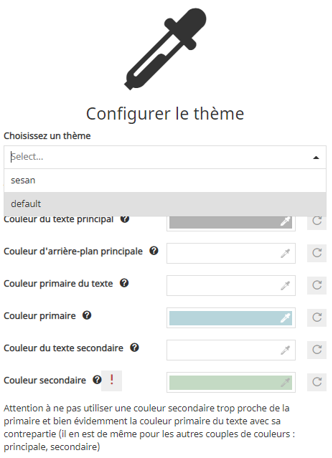
To make a theme the default one, update defaultState.theme.selectedTheme.id in localConfig.json.