Integration with geOrchestra
MapStore integration inside a geOrchestra SDI involves the following external parts:
Security integration
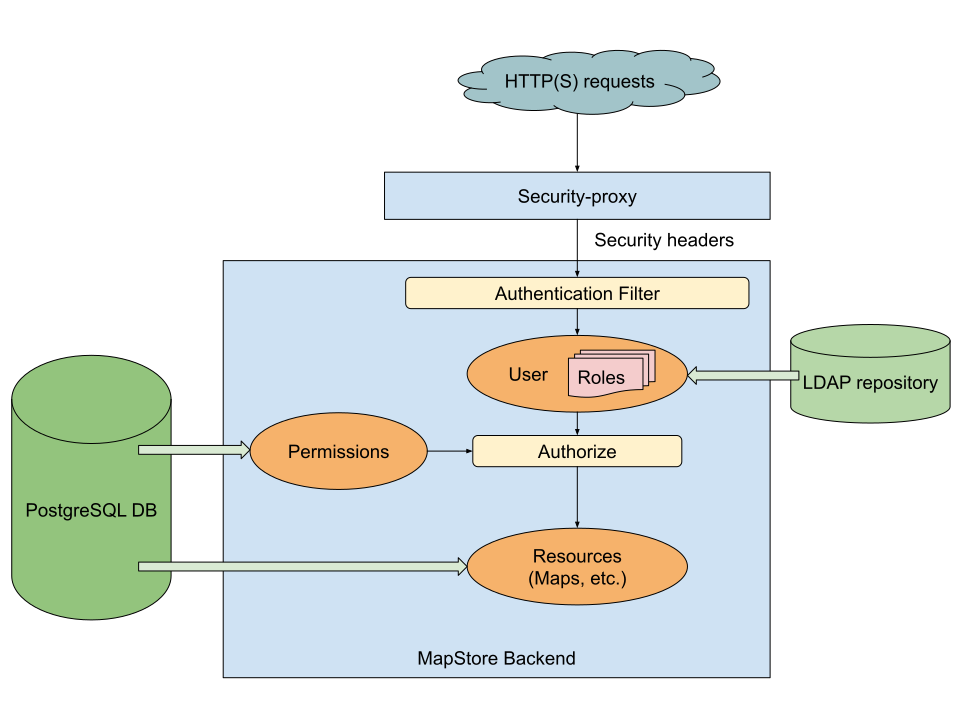
MapStore is integrated with the geOrchestra security infrastructure through:
- an authentication filter that reads the headers forwarded by the geOrchestra security proxy
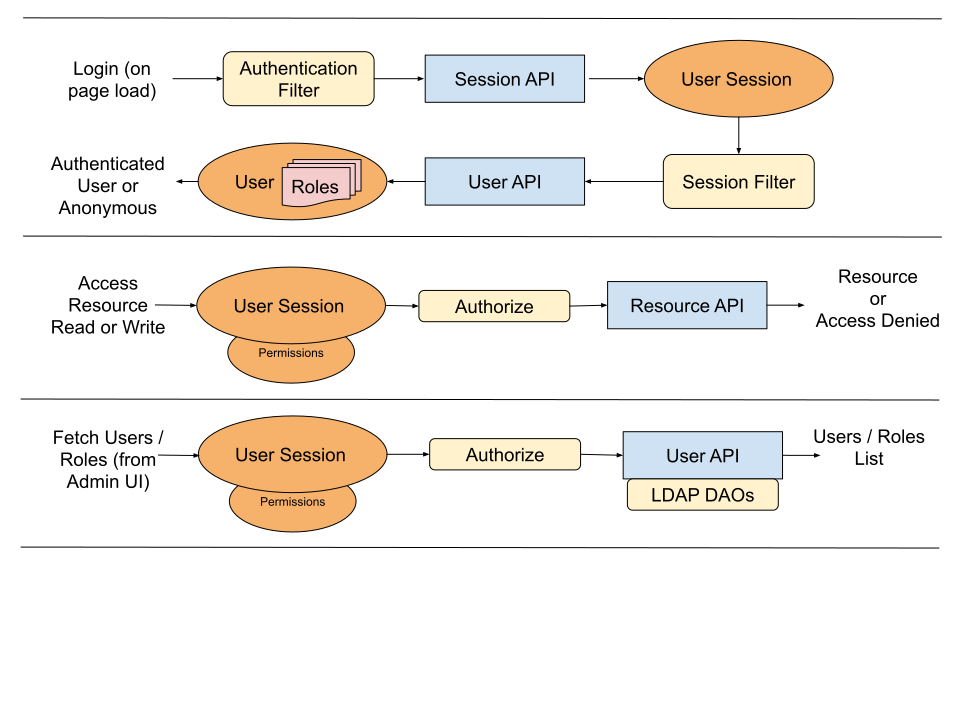
- LDAP-enabled DAOs used to fetch users and roles from the geOrchestra LDAP repository
Authentication filter
The authentication filter intercepts every MapStore backend request to extract the headers forwarded by the security proxy and use them to authenticate and authorize the current user.
In particular:
sec-usernameis used to authenticate the current usersec-rolesis used to assign MapStore groups to the current userMAPSTORE_ADMINis mapped to the MapStoreADMINrole
The filter is configured in geostore-security-proxy.xml:
<security:http auto-config="true" create-session="never">
    ...
    <security:custom-filter ref="headersProcessingFilter" before="FORM_LOGIN_FILTER"/>
    ...
</security:http>

<bean id="georchestraAuthenticationProvider"
    class="it.geosolutions.geostore.services.rest.security.PreAuthenticatedAuthenticationProvider">
</bean>

<bean class="it.geosolutions.geostore.services.rest.security.HeadersAuthenticationFilter"
    id="headersProcessingFilter">
    <property name="addEveryOneGroup" value="true"/>
    <property name="usernameHeader" value="sec-username"/>
    <property name="groupsHeader" value="sec-roles"/>
    <property name="listDelimiter" value=";"/>
    <property name="authoritiesMapper" ref="rolesMapper"/>
</bean>

<bean id="rolesMapper" class="it.geosolutions.geostore.core.security.SimpleGrantedAuthoritiesMapper">
    <constructor-arg>
        <map>
            <entry key="MAPSTORE_ADMIN" value="ADMIN"/>
        </map>
    </constructor-arg>
</bean>
LDAP integration
MapStore is integrated with the geOrchestra LDAP repository so that users and roles can be exposed consistently in the administration UI and used to assign permissions to resources such as maps and contexts.
This is also configured in geostore-security-proxy.xml:
<bean id="ldap-context" class="org.springframework.security.ldap.DefaultSpringSecurityContextSource">
    <constructor-arg value="${ldapScheme}://${ldapHost}:${ldapPort}/${ldapBaseDn}" />
    <property name="userDn" value="${ldapAdminDn}"/>
    <property name="password" value="${ldapAdminPassword}"/>
</bean>
<bean id="ldapUserDAO" class="it.geosolutions.geostore.core.dao.ldap.impl.UserDAOImpl">
    <constructor-arg ref="ldap-context"/>
    <property name="searchBase" value="${ldapUsersRdn}"/>
    <property name="memberPattern" value="^uid=([^,]+).*$"/>
    <property name="attributesMapper">
        <map>
            <entry key="mail" value="email"/>
            <entry key="givenName" value="fullname"/>
            <entry key="description" value="description"/>
        </map>
    </property>
</bean>
<bean id="ldapUserGroupDAO" class="it.geosolutions.geostore.core.dao.ldap.impl.UserGroupDAOImpl">
    <constructor-arg ref="ldap-context"/>
    <property name="searchBase" value="${ldapRolesRdn}"/>
    <property name="addEveryOneGroup" value="true"/>
</bean>
<alias name="ldapUserGroupDAO" alias="userGroupDAO"/>
<alias name="ldapUserDAO" alias="userDAO"/>
LDAP connection settings are read from the geOrchestra default.properties file and mapped to internal variables such as ${ldapHost}.
To configure the default.properties location, geOrchestra uses the standard georchestra.datadir environment variable.
For local development, the JVM typically needs:
-Dgeorchestra.datadir=/etc/georchestra
Architecture diagrams
The following diagrams summarize how the security-related pieces work together: