Catalog services configuration
The official documentation is here.
The MapStore catalogue is a very important feature because it allows users to retrieve and load data exposed through the following protocols/standards:
- CSW
- WMS
- WMTS
- TMS
- COG
CSW service
The Catalog Service for the Web (CSW) is an OGC standard used to publish and search geospatial data and associated metadata on the Internet.
GeoNetwork is the geOrchestra module that allows you to store, modify, and distribute metadata. To query it, you must use the CSW protocol.
Add
To add a CSW catalog, simply click the "+" icon next to the catalog and then configure it by providing a name and a simple URL like this:
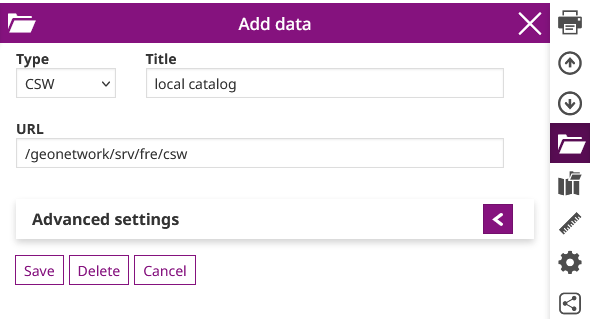
Advanced Settings
It is recommended to configure a static filter and a dynamic filter by default.
These two filters allow you to narrow or broaden the search, which is based on keyword input. Response times can vary significantly.
Recommended static filter:
<ogc:Or>
  <ogc:PropertyIsEqualTo matchCase='true'>
    <ogc:PropertyName>Type</ogc:PropertyName>
    <ogc:Literal>data</ogc:Literal>
  </ogc:PropertyIsEqualTo>
  <ogc:PropertyIsEqualTo matchCase='true'>
    <ogc:PropertyName>Type</ogc:PropertyName>
    <ogc:Literal>dataset</ogc:Literal>
  </ogc:PropertyIsEqualTo>
  <ogc:PropertyIsEqualTo matchCase='true'>
    <ogc:PropertyName>Type</ogc:PropertyName>
    <ogc:Literal>datasetcollection</ogc:Literal>
  </ogc:PropertyIsEqualTo>
  <ogc:PropertyIsEqualTo matchCase='true'>
    <ogc:PropertyName>Type</ogc:PropertyName>
    <ogc:Literal>series</ogc:Literal>
  </ogc:PropertyIsEqualTo>
</ogc:Or>
This CSW query therefore restricts the default search to metadata of the following types:
- "data"
- "dataset"
- "datasetcollection"
Dynamic filter recommendation:
<ogc:Or>
  <ogc:PropertyIsLike matchCase='false' wildCard='*' singleChar='.' escapeChar='!'>
    <ogc:PropertyName>Title</ogc:PropertyName>
    <ogc:Literal>${searchText}*</ogc:Literal>
  </ogc:PropertyIsLike>
  <ogc:PropertyIsLike matchCase='false' wildCard='*' singleChar='.' escapeChar='!'>
    <ogc:PropertyName>AlternateTitle</ogc:PropertyName>
    <ogc:Literal>${searchText}*</ogc:Literal>
  </ogc:PropertyIsLike>
  <ogc:PropertyIsLike matchCase='false' wildCard='*' singleChar='.' escapeChar='!'>
    <ogc:PropertyName>Abstract</ogc:PropertyName>
    <ogc:Literal>${searchText}*</ogc:Literal>
  </ogc:PropertyIsLike>
  <ogc:PropertyIsLike matchCase='false' wildCard='*' singleChar='.' escapeChar='!'>
    <ogc:PropertyName>Subject</ogc:PropertyName>
    <ogc:Literal>${searchText}*</ogc:Literal>
  </ogc:PropertyIsLike>
  <ogc:PropertyIsLike matchCase='false' wildCard='*' singleChar='.' escapeChar='!'>
    <ogc:PropertyName>Description</ogc:PropertyName>
    <ogc:Literal>${searchText}*</ogc:Literal>
  </ogc:PropertyIsLike>
  <ogc:PropertyIsLike matchCase='false' wildCard='*' singleChar='.' escapeChar='!'>
    <ogc:PropertyName>Source</ogc:PropertyName>
    <ogc:Literal>${searchText}*</ogc:Literal>
  </ogc:PropertyIsLike>
  <ogc:PropertyIsLike matchCase='false' wildCard='*' singleChar='.' escapeChar='!'>
    <ogc:PropertyName>OrganisationName</ogc:PropertyName>
    <ogc:Literal>${searchText}*</ogc:Literal>
  </ogc:PropertyIsLike>
</ogc:Or>
With this query, keywords will be specifically searched in the Title, AlternateTitle, Abstract, Subject, Description, Source and OrganisationName metadata descriptors.
WMS service
TODO
WMTS service
TODO
TMS service
TODO
COG service
TODO